
Can AI Watch Videos?
Which AI can watch YouTube videos? (October 2026)
- Gemini: yes, for public videos. Paste a YouTube link into Gemini and it can summarise the video and answer questions. Google's developer docs say the Gemini API takes public YouTube videos only (not private or unlisted ones) and looks at about one frame per second by default.
- Gemini in Chrome and YouTube's "Ask" button: Google is rolling out ways to ask about the video you're watching, right in Chrome or on YouTube. Whether you have them yet depends on your country, account and device.
- Microsoft Copilot: in the Edge sidebar it can summarise a YouTube video you have open and answer questions about it.
- ChatGPT: can't play a YouTube link. It works from text it can find about the video. It accepts video file uploads, but OpenAI says it may not analyse the whole video or its audio. More in Can ChatGPT watch YouTube videos?
- Claude: can't watch videos and doesn't accept video uploads. It reads images and PDFs very well, though. More in Can Claude watch YouTube videos?
- AI coding agents (Claude Code, Codex, Cursor): they read images and text files, not video. More in How to give a YouTube tutorial to Claude Code, Cursor or Codex.
How does AI "watch" a video?
Even an AI that watches video doesn't see it the way you do. It turns the video into pieces it can read: still frames (often about one per second), the spoken words as text, and sometimes the sound. Gemini does this for you. For every other AI, a tool has to do it.
That's why the frames matter. A transcript only holds what was said. Code typed on screen, a formula on a slide, or a setting clicked without being named only shows up in the frames.
How to let any AI watch a YouTube video
- Install FrameCap from the Chrome Web Store (free, no account).
- Open the YouTube video and click the FrameCap button on the page.
- Choose how often to capture a frame (every 1 to 30 seconds) and which part of the video.
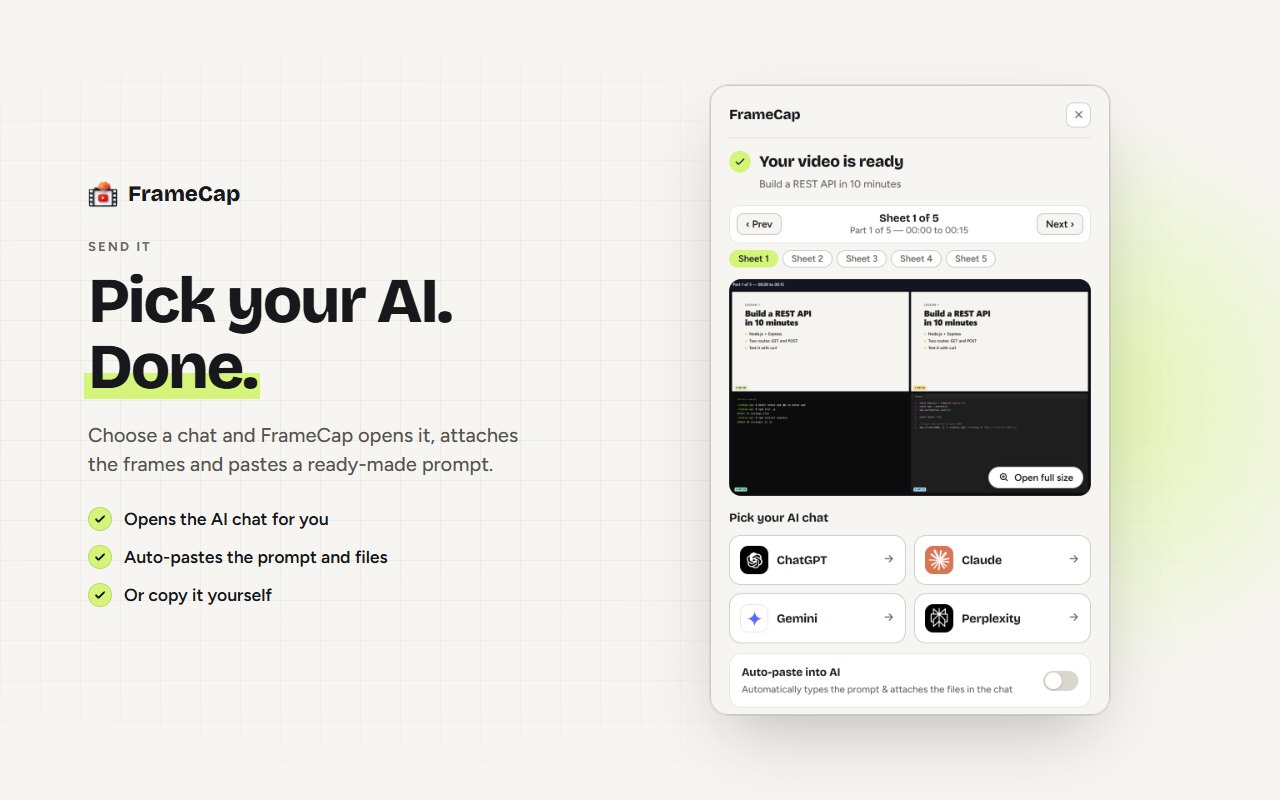
- Click Send to AI and pick ChatGPT, Claude, Gemini or Perplexity. FrameCap opens it with a PDF of the frames, the transcript and a ready prompt. For coding agents, download the ZIP instead.
- Ask your question, for example: "What's on the slide at 12:40?"
Can AI watch a video without speech?
Yes, if it gets the pictures. A silent screen recording has no words, so a transcript tool gives the AI nothing to work with, while frames still show everything that happens. FrameCap captures the frames whether or not anyone speaks. It just can't add words without captions, because it doesn't do speech-to-text yet.
Is there a free AI video watcher?
Yes. Gemini is free for public YouTube videos. FrameCap is free and works with the free plans of ChatGPT, Claude, Gemini and Perplexity, within each AI's own upload limits. Open-source tools for coding agents, such as the /watch skill, are free too, but they run in a terminal and download the video first.
Which one should you use?
- A quick summary of a public talk or podcast: Gemini, or any transcript-based summary extension.
- A tutorial or lecture where the code, slides or settings are on screen, in the AI you already use: FrameCap. It also works on unlisted videos you can open.
- A tutorial for your coding agent: FrameCap's ZIP, or an open-source skill if you prefer the terminal.
Limits to know
- FrameCap works on YouTube only, for now.
- Videos up to 60 minutes. Live streams aren't supported.
- The transcript needs the video to have captions (auto-generated captions work). FrameCap doesn't do speech-to-text yet.
- FrameCap sends still frames, not motion or sound.
FAQ
Can AI watch YouTube videos?
Gemini can watch public YouTube videos from a link. ChatGPT and Claude can't play YouTube videos, but they can read frames of the screen and the transcript, which FrameCap captures in one click.
How does AI watch a video?
It turns the video into still frames and text: tools like Gemini look at about one frame per second, plus the spoken words. FrameCap does the same for any AI by capturing sharp, timestamped frames and the transcript.
Can AI watch a video without speech?
Yes, if it gets frames of the screen. A transcript has nothing to offer for a silent video, but frames still show what happens.
Is AI video watching free?
It can be. Gemini is free for public YouTube videos, and FrameCap is free and works with the free plans of ChatGPT, Claude, Gemini and Perplexity.